关于char模式文本缓存查看研究
怎么查看char模式文本缓存内容?我们可以借鉴官方关于动态合图的方式在场景的最上层加上一层来显示char缓存的文本内容,废话不多说,直接上代码
(() => {
//@ts-ignore
cc.Label.prototype.showDebug = function (show) {
if (show) {
if (!this._debugNode || !this._debugNode.isValid) {
let width = cc.visibleRect.width;
let height = cc.visibleRect.height;
this._debugNode = new cc.Node("SHAREATLAS_DEBUG_NODE");
this._debugNode.width = width;
this._debugNode.height = height;
this._debugNode.x = width / 2;
this._debugNode.y = height / 2;
this._debugNode.zIndex = cc.macro.MAX_ZINDEX;
this._debugNode.parent = cc.director.getScene();
//@ts-ignore
this._debugNode.groupIndex = cc.Node.BuiltinGroupIndex.DEBUG;
//@ts-ignore
cc.Camera._setupDebugCamera();
let scroll = this._debugNode.addComponent(cc.ScrollView);
let content = new cc.Node("CONTENT");
let layout = content.addComponent(cc.Layout);
layout.type = cc.Layout.Type.VERTICAL;
layout.resizeMode = cc.Layout.ResizeMode.CONTAINER;
content.parent = this._debugNode;
content.width = 2048;
content.anchorY = 1;
content.x = 2048;
scroll.content = content;
let node = new cc.Node("ATLAS");
//@ts-ignore
let texture = cc.Label._shareAtlas.getTexture();
let spriteFrame = new cc.SpriteFrame();
spriteFrame.setTexture(texture);
let sprite = node.addComponent(cc.Sprite);
sprite.spriteFrame = spriteFrame;
node.parent = content;
}
return this._debugNode;
} else {
if (this._debugNode) {
this._debugNode.parent = null;
this._debugNode = null;
}
}
};
})();
直接写一个自执行函数为 cc.Label.prototype 添加一个 showDebug 方法。之后就可以在控制台上执行方法来查看char文本缓存
我们来看下效果:
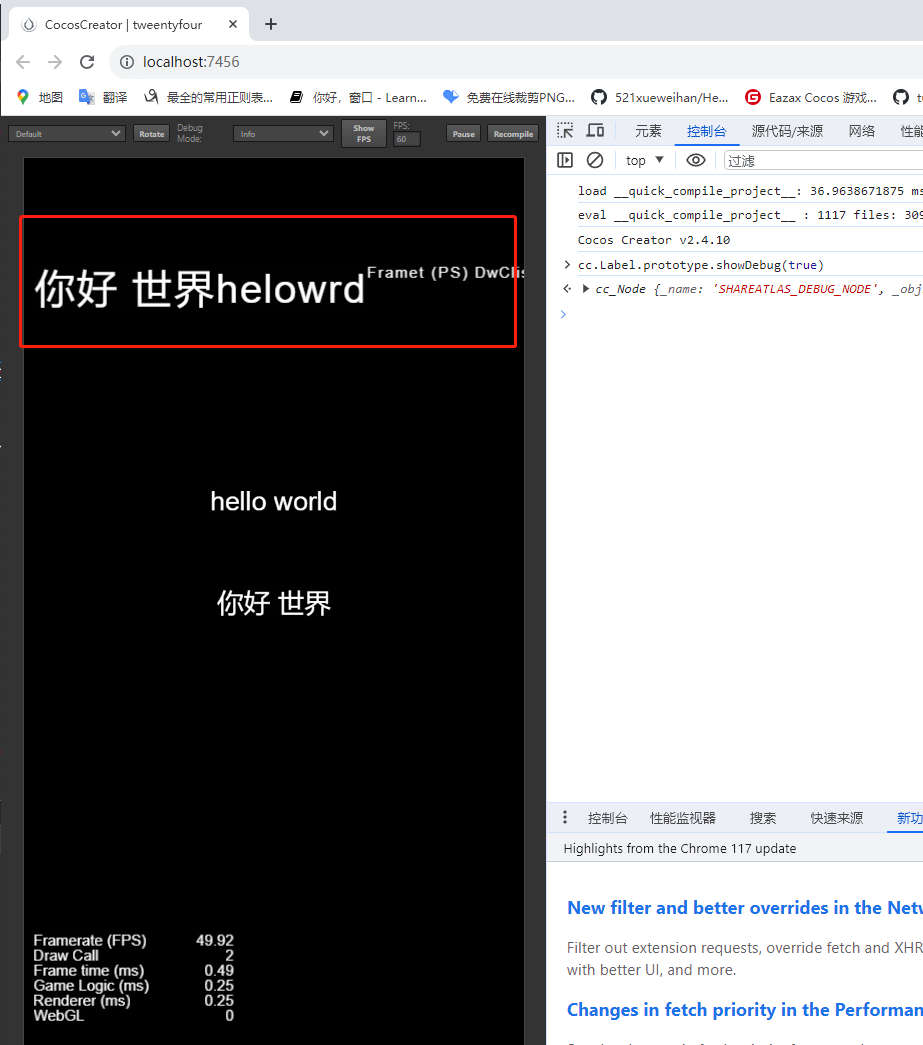
在控制台执行cc.Label.prototype.showDebug(true) 方法则可以在场景最上层看到当前的文本缓存。小伙伴们执行的时候可能会出现看不见的情况,别慌,因为默认设置了图层大小为2048*2048 ,拖动一下就能看到了。
在控制台执行cc.Label.prototype.showDebug(false) 将关闭显示
小伙伴们如果不知道什么是自执行函数,随便新建一个文件后缀名改成ts,将上面代码拷入文件中既能生效